Challenge your students to think deeply about ideas in your content area with this critical thinking game, Links. All you have to do it come up with 16 terms and then let students go to work as they look for common threads among ideas. To win, students have to group the 16 terms into 4 groups of 4, with each group containing a common thread that links them all together.
What You’ll Need
- Links slide deck
- Paper
- For more hands-on experience, you can print the terms out
Setup
Setup is easy. After you’ve made a copy of the slide deck (see below), you just have to come up with 16 terms related to your content. You will need to make sure that you have 4 groups of 4 terms that are related in some way. You’ll want to give each group a category name, depending on which variation of the game you’re using. Use the answer slide at the end of the presentation to display the categories and answers.
Additionally, if you want a more hands-on version, you can print out the term squares and have students sort them into the 4 groups.
Here are some examples of terms and categories:
- Rhetorical Appeals: Ethos, Pathos, Logos, Kairos
- Prime Numbers: 1, 7, 13, 23
- Notorious Dictators: Stalin, Hitler, Castro, Mussolini
- Words that describe a kind character: smile, help, generous, amiable
You can make the connections as easy or difficult as you want.
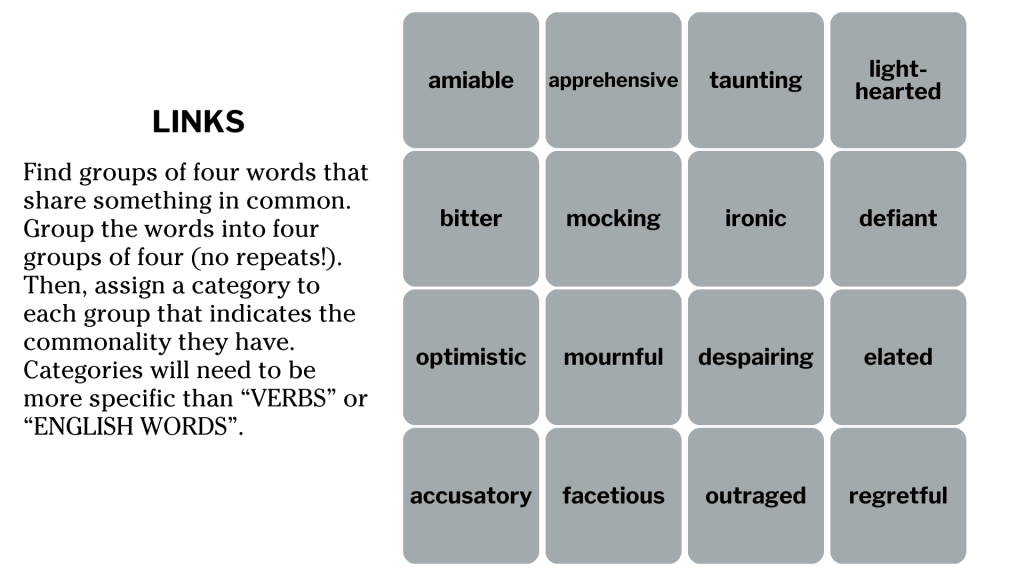
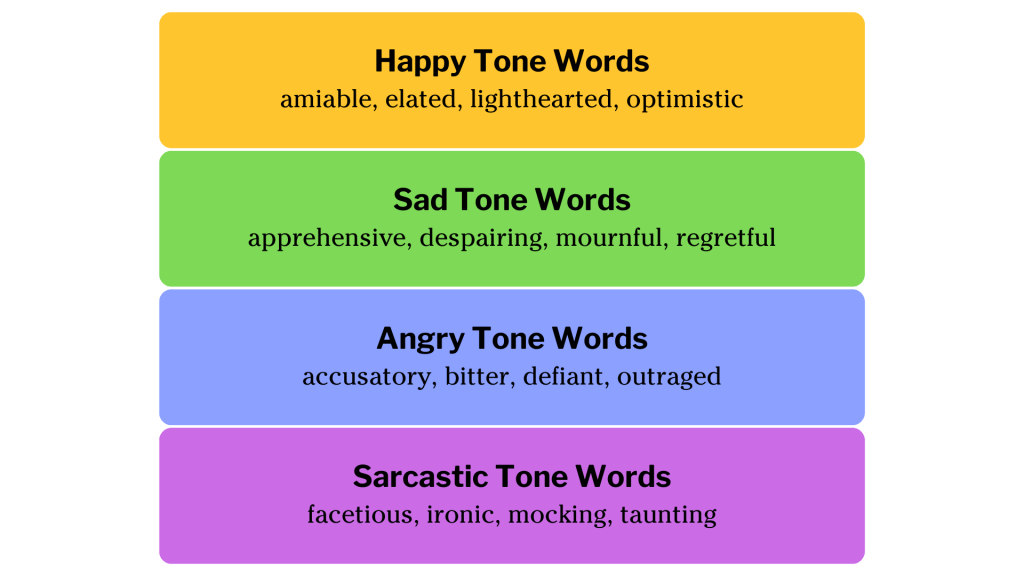
Game on!
Once you have the game set up, start the presentation, and you’re ready to go. Links can be done by individuals, pairs, or teams. I prefer pairs or teams as it adds in some communication skills. Students not only have to communicate what they think, but they’ll also have to defend their ideas.
At its core, the game follows two easy steps.
- Project the game slide that contains the 16 terms you created.
- Students then work to group the terms into 4 groups of 4. Each group of words should have some kind of connecting theme they all fit into.
- Optional for the standard game: To make things a little smoother, you may add in checks for single groupings at a time. Any time a student or team creates a group of 4, you can give them a yes or no for the group. This can help narrow down options for any more difficult groups.
There are a few variations of this game that you could use throughout the school year to give a little variety.
Game Variations
Standard Game: The standard game would contain a single answer slide that you would come up with. This could be useful for review or terms that students should know well and be able to easily group.
Open-ended Variation: The open-ended variation is just like the standard, except this version doesn’t have a specific answer. Students would need to create their own categories and be able to defend them. This would increase the difficulty a little more.
Whole Group Variation: Use this as a whole class instructional tool. Present the 16 terms. Have students guess which words would group together, and generate a class discussion about the terms and what they have in common. This could be a great way to introduce a unit that may have some unfamiliar terminology, or to determine prior knowledge of a unit.
Individual Assignment: Use this as a replacement for a traditional vocabulary assignment. Give each student a copy of the terms and have them do the grouping and explain their reasoning to see how well they really know the vocabulary.
Teaching Points
Critical Thinking: At its core, the game is an exercise in critical thinking. The exercise forces students to look at different meanings, uses, and interpretations of the different terms. Discuss with the class how they had to observe, analyze, and evaluate different combinations of terms along with the conclusions they drew with the information.
Communication: If you use the team variations of the game, students can reflect on how well they communicated with other members of their team. Were all members able to express their ideas? Did anyone dominate the conversation? Was anyone’s voice ignored? What are some takeaways that would help improve communication in future group discussions?
Explaining and Elaborating Ideas: When deciding on final answers, students will have to be able to justify their reasonings for the way they grouped terms together. This activity provides a great opportunity for students to work on explaining their reasoning and elaborating on ideas.
Downloads
Download the Google or Canva version of Matching Minds. For Google, click the button below, then click the blue “Use Template” button. For Canva, click the button below, then click “File” and “Make a Copy”.
 The Educator's Quest